You might be wondering, wouldn’t it be great if we had all our holidays already be on our Outlook calendars, so that we need not find that somewhere in a .pdf file sent at the beginning of the year or to go through the corporate intranet portal.
Friday, January 15, 2021
How to create a custom holiday file for your organization
Monday, September 4, 2017
FIFA 2018 World Cup Tickets
According to FIFA website, for Russian citizens, tickets to the matches will start at 1,280 rubles for early round matches, and sell for as much as 7,040 rubles for final matches. For non-Russians, however, early round ticket prices will start at $105 and go as high as $1,100 for final matches, according to FIFA’s website.
Wednesday, October 15, 2014
EPS Topik Exam Result 2014
Only 6.2 % of the applicants have passed the test.
Passing criteria : Applicants who scored 80% of the marks are considered pass for Manufacturing category while applicants who scored 78% are considered pass for Agriculture.
Total : 3663 have passed.
Agriculture : 895
Manufacturing: 2768
Among these only 200 are female, 3463 are male applicants.
Please find the attached file.
Click Here To Download
Friday, August 29, 2014
Removing Bueno Search
Bueno Search Removal
Windows 8
- Move mouse cursor to the bottom right of the screen.
- Click Settings and go to Control Panel.
- Select Uninstall a program and remove Bueno Search.
Windows Vista & Windows 7
- Open Start menu and click Control Panel.
- Go to Uninstall a program and remove Bueno Search.
Windows XP
- Open Start menu and go to Control Panel.
- Select Add or remove programs and uninstall Bueno Search.
How to remove Bueno Search from browser
Mozilla Firefox
- Click Firefox button and go to Options.
- Under General tab, click Restore to Default button and click OK.
- Click the search engine icon on the left of search box (top right corner).
- Select Manage search engines and remove Bueno Search from the list. Click OK.
- Press Ctrl+Shift+A and Add-ons manager tab will open.
- Disable and remove Bueno Search from Extensions.
Internet Explorer
- Press Alt+X and click Internet options.
- Under General tab, click Use Default and click OK.
- Press Alt+X again and to go Manage add-ons.
- Remove Bueno Search from Toolbars and Extensions.
- Click Search providers on the left.
- Set a new default search engine, remove Bueno Search.
Google Chrome
- Press Alt+F and go to Tools.
- Click Extensions and remove Bueno Search.
- Click Settings on the left and mark Open a specific page or set of pages.
- Click Set pages and change your home page address. Click OK.
- Select Manage search engines under Search.
- Set a new default search engine, delete Bueno Search and click Done.
Wednesday, July 23, 2014
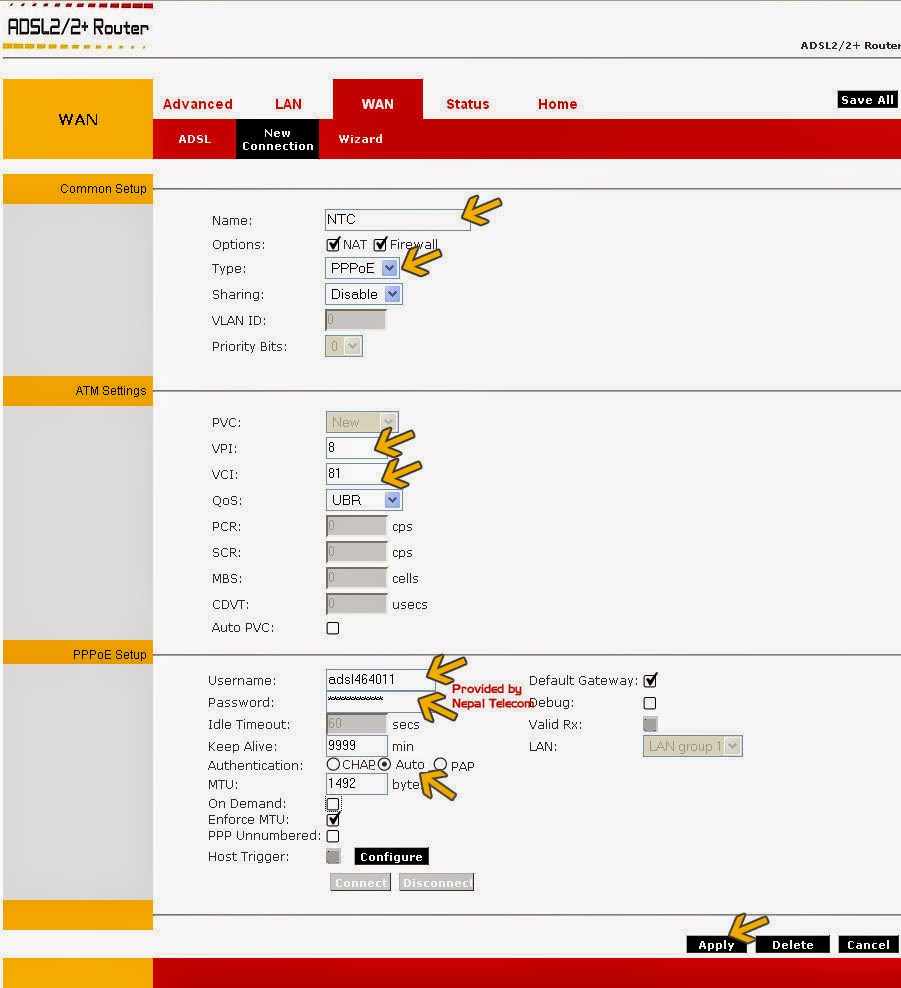
NTC ADSL Configuration
4. Remember, the required settings for ADSL are
VPI – 8
VCI – 81
Connection type/ ISP = PPPoE
Username and passwords as given by Nepal telecom
PPPoE service name = ntc
Authentication = AUTO
Encapsulation = LLC
![]() |
| Step 2 |
![]() |
| Step 3 |
![]() |
| Step 4 |
![]() |
| Step 5 |
![]() |
| Step 6 |
![]() |
| Step 7 |
![]() |
| Step 8 |
![]() |
| Step 1 |
![]() |
| Step 2 |
![]() |
| Step 1 |
![]() |
| Step 2 |
![]() |
| Step 3 |
![]() |
| Step 4 |
![]() |
| Step 5 |
![]() |
| Step 6 |
![]() |
| Step 1 |
![]() |
| Step 2 |
![]() |
| Step 3 |
![]() |
| Step 4 |
![]() |
| Step 5 |
Digicom – www.ntc.net.np/internet/adsl/adslRouterConf/digicom/digicom.html
Dlink – www.ntc.net.np/internet/adsl/adslRouterConf/dlink/dlink2730U.html
Cnet – www.ntc.net.np/internet/adsl/adslRouterConf/cnet/car2-804.html
How to recharge NTC ADSL from phones ?
Steps to follow:
Step 1. Dial 1413 from your mobile or land line phone
Step 2. Press 1 for Nepali ( if you want instructions in Nepali) or 2 to proceed in English
Step 3. Press 4 for unlimited ADSL and enter your phone number like 015555555# (IMP: the number should be followed by # key)
Step 4. If your ADSL is volume base like 20 GB , 10 GB per month then press 5 and enter the phone number like 015555555# and the number should be followed by # key
Step 5. After the completion of the previous steps, press the PIN code from your Pre-paid recharge card followed by # like for example 1234 5678 8900 3456# the PIN code should also followed by the #key
Step 6. If your recharge card is Nrs.100 or Nrs. 200 or Nrs. 1000 then respective amount will be pay for your ADSL.
For any other queries do write to me or leave comments below.
Tuesday, June 11, 2013
Tuesday, June 5, 2012
Online Shopping Sites in Nepal
I'll update the list as I get anything new. Please do send feedbacks and also any sites that you know.
I've listed them in alphabetical order.
Sunday, December 4, 2011
Thursday, December 1, 2011
Can you crack It !!!
EB 04 AF C2 BF A3 81 EC 00 01 00 00 31 C9 88 0C
0C FE C1 75 F9 31 C0 BA EF BE AD DE 02 04 0C 00
D0 C1 CA 08 8A 1C 0C 8A 3C 04 88 1C 04 88 3C 0C
FE C1 75 E8 E9 5C 00 00 00 89 E3 81 C3 04 00 00
00 5C 58 3D 41 41 41 41 75 43 58 3D 42 42 42 42
75 3B 5A 89 D1 89 E6 89 DF 29 CF F3 A4 89 DE 89
D1 89 DF 29 CF 31 C0 31 DB 31 D2 FE C0 02 1C 06
8A 14 06 8A 34 1E 88 34 06 88 14 1E 00 F2 30 F6
8A 1C 16 8A 17 30 DA 88 17 47 49 75 DE 31 DB 89
D8 FE C0 CD 80 90 90 E8 9D FF FF FF 41 41 41 41
Can you crack it ???
Friday, July 8, 2011
Difference between Row Number, Rank and Dense Rank
What is the Difference between ROW_NUMBER, RANK and DENSE_RANK? Which one to use?
This is very common question in the minds of SQL newbie's. -- create table
Lets take 1 simple example to understand the difference between 3.
First lets create some sample data :
CREATE TABLE Salaries
(
Names VARCHAR(1),
SalarY INT
)
GO
-- insert data
INSERT INTO Salaries SELECT
'A',5000 UNION ALL SELECT
'B',5000 UNION ALL SELECT
'C',3000 UNION ALL SELECT
'D',4000 UNION ALL SELECT
'E',6000 UNION ALL SELECT
'F',10000
GO
-- Test the data
SELECT Names, Salary
FROM Salaries
Now lets query the table to get the salaries of all employees with their salary in descending order.
For that I'll write a query like this :
| SELECT names | |
| NAMES | SALARY | ROW_NUMBER | RANK | DENSE_RANK |
| F | 10000 | 1 | 1 | 1 |
| E | 6000 | 2 | 2 | 2 |
| A | 5000 | 3 | 3 | 3 |
| B | 5000 | 4 | 3 | 3 |
| D | 4000 | 5 | 5 | 4 |
| C | 3000 | 6 | 6 | 5 |
Interesting Names in the result are employee A, B and D.
Row_number assign different number to them.
Rank and Dense_rank both assign same rank to A and B.
But interesting thing is what RANK and DENSE_RANK assign to next row?
Rank assign 5 to the next row, while dense_rank assign 4.
The numbers returned by the DENSE_RANK function do not have gaps and always have consecutive ranks. The RANK function does not always return consecutive integers. The ORDER BY clause determines the sequence in which the rows are assigned their unique ROW_NUMBER within a specified partition.
So question is which one to use?
Its all depends on your requirement and business rule you are following.
1. Row_number to be used only when you just want to have serial number on result set. It is not as intelligent as RANK and DENSE_RANK.
2. Choice between RANK and DENSE_RANK depends on business rule you are following. Rank leaves the gaps between number when it sees common values in 2 or more rows. DENSE_RANK don't leave any gaps between ranks.
So while assigning the next rank to the row RANK will consider the total count of rows before that row and DESNE_RANK will just give next rank according to the value.
So If you are selecting employee’s rank according to their salaries you should be using DENSE_RANK and if you are ranking students according to there marks you should be using RANK(Though it is not mandatory, depends on your requirement.)
Tuesday, June 7, 2011
Rajesh Hamal Jokes
- Rajesh Hamal inserts his Visiting Card in Any ATM & Collects Cash.
- Ghosts sit around the campfire and tell RAJESH HAMAL stories.
- Shahrukh khan was born in Nepal. He wanted to be a SuperStar. Knowing it would be impossible to top Rajesh dai in Kollywood, Sharukh went to Bollywood.
- Once Rajesh Hamal was having his dinner, right then he became angry with his mom and threw his dinner plate on the air… Now people refer it as FLYING SAUCER or UFO!!
- Last monday Rajesh Dai updated status in his wall. “Osama bin laden dead
)” After few minutes, A notification came on his profile. “Osama Bin Laden likes your status” :O - God walks on the water… but RAJESH HAMAL swims across the dry land !!!
- One day Rajnikanth, Spiderman , Superman, Batman,Bruce lee and Chuck Norris visited Rajesh dai’s house … it was an auspicious day of GURU PURNIMA !!!
- Rajesh Hamal can race with a bullet and win.
- Rajesh Hamal can divide by zero.
- Guns don’t kill people. Rajesh Hamal kills people.
- There is no such thing as global warming. Rajesh Hamal was cold, so he turned the sun up.
- Rajesh Hamal has counted to infinity. Twice !!!
- When Rajesh Hamal falls in water, Rajesh Hamal doesn’t get wet. Water gets Rajesh Hamal.
- When you say “No one’s Perfect”, Rajesh Hamal takes this as a personal insult.
- Rajesh Hamal doesn’t actually write books, the words assemble themselves out of fear. (Wish I could do that for my blog posts.)
- The pen is mightier than the sword, but only if the pen is held by Rajesh Hamal.
- Rajesh Hamal can retrieve items deleted from Recycle bin after shredding.
- Rajesh Hamal can delete the Recycle Bin.
- Rajesh Hamal doesn’t wear a watch. He decides what time it is.
- Rajesh Hamal once killed the sea & that sea is now called Dead Sea.
- Rajesh Hamal can slam a revolving door and he can make it reverse.
- Rajesh Hamal can make onions cry.
- Rajesh Hamal doesn’t breathe. Air hides in his lungs for protection.
- There are no weapons of mass destruction in Iraq because Rajesh Hamal lives in Katmandu.
- Rajesh Hamal killed Harry Potter so No Harry Potter’s Eighth book.
- Rajesh Hamal has already been to Mars, that’s why there are no signs of life there.
- Rajesh Hamal doesn’t move at the speed of light. Light moves at the speed of Rajesh Hamal.
- Rajesh Hamal kills two stones with one bird.
- Rajesh Hamal can easily handle the truth.
- Chuck Norris once met Rajesh Hamal. The result – He was reduced to a joke on the Internet.
- Rajesh Hamal’s calendar goes straight from March 31st to April 2nd, no one fools Rajesh Hamal.
- Words like awesomeness, brilliance, legendary etc. were added to the dictionary in the year 1964. That was the year Rajesh Hamal was born.
- Time and tide waits for no one but Rajesh Hamal.
- Rajesh Hamal can answer a missed call.
- Once a cobra bit Rajesh Hamal’ leg. After five days of excruciating pain, the cobra died.
- Ghosts are actually caused by Rajesh Hamal, its because of killing people faster than death can process them.
- When Rajesh Hamal looks in a mirror it shatters, because the mirror is not stupid enough to get in between the two Rajesh Hamals.
- Rajesh Hamal got his drivers license at the age of 16 Seconds.
- When studying, Rajesh Hamal used to practise the english spelling in his copies and collection of those are known as Oxford Dictionary nowadays.
- Rajesh Hamal does not use spell check. If he happens to misspell a word, Oxford will simply change the actual spelling of it.
- The Bermuda Triangle used to be the Bermuda Square, until Rajesh Hamal kicked one of the corners off.
- It takes Rajesh Hamal only 10 mins to watch 60 minutes.
- If you google search “Rajesh Hamal getting kicked” your search will generate 0 results. It just doesn’t happen.
- Rajesh Hamal’s house has no doors, only walls that he walks through.
- Rajesh Hamal grinds his coffee with his teeth and boils the water with his own rage.
- Rajesh Hamal once age an entire bottle of sleeping pills. They made him blink.
- The only thing that runs faster and longer than Rajesh Hamal are his films.
- Rajesh Hamal’s every step creates a mini whirlwind. Hurricane Katrina was the result of a morning jog.
- Where there is a will, there is a way. Where there is Rajesh Hamal there is no other way.
- Rajesh Hamal can build a snowman out of rain.
- Neil Armstrong was the first man to walk on the moon. Rajesh Hamal was the first man to walk on the sun.
Thursday, May 19, 2011
List of keyboard shortcuts in Mozilla Firefox
Navigation
| Command________________ | Shortcut____________ |
| Back | Altcommand+Left Arrow |
| Forward | Altcommand+Right Arrow |
| Home | AltOpt+Home |
| Open File | Ctrlcommand+O |
| Reload | F5 |
| Reload (override cache) | Ctrl+F5 |
| Stop | command+. |
Current Page
| Command________________ | Shortcut____________ |
| Go to Bottom of Page | End |
| Go to Top of Page | Home |
| Move to Next Frame | F6 |
| Move to Previous Frame | Shift+F6 |
| | Ctrlcommand+ I |
| Page Source | Ctrlcommand+U |
| | Ctrlcommand+P |
| Save Page As | Ctrlcommand+S |
| Ctrlcommand++ | |
| Ctrlcommand+- | |
| Ctrlcommand+0 |
Editing
| Command________________ | Shortcut____________ |
| Copy | Ctrlcommand+C |
| Cut | Ctrlcommand+X |
| Delete | Delete |
| Paste | Ctrlcommand+V |
| Redo | Ctrlcommand+YShift+Z |
| Select All | Ctrlcommand+A |
| Undo | Ctrlcommand+Z |
Search
| Command________________ | Shortcut____________ |
| Find | Ctrlcommand+F |
| Find Again | F3 |
| Find Previous | Shift+F3 |
| Find As You Type Link | ' |
| Find As You Type Text | / |
| Ctrlcommand+K |
Windows & Tabs
See also Tabbed browsing
| Command________________ | Shortcut____________ | |
| Close Tab | Ctrlcommand+W | |
| Close Window | Ctrlcommand+Shift+W | |
| Move Tab in focus Left | Ctrlcommand+Left Arrow | |
| Move Tab in focus Right | Ctrlcommand+Right Arrow | |
| Move Tab in focus to start | Ctrlcommand+Home | |
| Move Tab in focus to end | Ctrlcommand+End | |
| New Tab | Ctrlcommand+T | |
| New Window | Ctrlcommand+N | |
| Next Tab | Ctrl+Tab | |
| Open Address in New Tab | AltOpt+EnterReturn | - from Location Bar or Search Bar |
| Previous Tab | CtrlCtrl+Shift+Tab |
|
| Undo Close Tab | Ctrlcommand+Shift+T |
|
| Undo Close Window | Ctrlcommand+Shift+N |
|
| Select Tab (1 to 8) | CtrlAltcommand+(1 to 8) |
|
| Select Last Tab | CtrlAltcommand+9 |
|
| Tab Groups View | Ctrlcommand+ Shift+E |
|
History
| Command________________ | Shortcut____________ |
| History sidebar | Ctrlcommand+shift+H |
| Library window (History) | Ctrl + Shift + H |
Bookmarks
| Command________________ | Shortcut____________ |
| Bookmark All Tabs | Ctrlcommand+ Shift+D |
| Bookmark This Page | Ctrlcommand+D |
| Bookmarks sidebar | Ctrlcommand+B |
| Library window (Bookmarks) | Ctrlcommand+Shift+BO |
Tools
| Command________________ | Shortcut____________ |
| Ctrl + JCtrl + Shift + Ycommand + J | |
| Add-ons | Ctrl + Shift + Acommand + Shift + A |
| Error Console | Ctrl + Shift + Jcommand + Shift + J |
| Web Console | Ctrl + Shift + Kcommand + Shift + K |
| Toggle Private Browsing | Ctrl + Shift + Pcommand + Shift + P |
| Ctrl + Shift + Del command + Shift + delete |
Miscellaneous
| Command________________ | Shortcut____________ | |
| Complete .com Address | Ctrlcommand+EnterReturn | |
| Complete .net Address | Shift+EnterReturn | |
| Complete .org Address | Ctrlcommand+Shift+EnterReturn | |
| Delete Selected Autocomplete Entry | Shift+ Del | |
| Toggle Full Screen | command+Shift+FF11 | |
| HelpHelp | F1command+? | |
| Toggle Menu Bar (when hidden) | Alt | |
| Show/Hide Add-on Bar | Ctrl + /command + / | |
| F7 | ||
| Select Location Bar | Alt+D Ctrlcommand+L | |
| Select or Manage Search Engines | AltOpt+Up Arrow | - when Search Bar is focused |
Media shortcuts (Ogg and WebM Videos Only)
| Command________________ | Shortcut____________ |
| Toggle Play / Pause | Space |
| Decrease volume | Arrow down |
| Increase volume | Arrow up |
| Mute audio | Ctrl+Down Arrowcommand+Down Arrow |
| Unmute audio | Ctrl+Arrow upcommand+Up Arrow |
| Seek back 15 seconds | Left Arrow |
| Seek back 10 % | Ctrl+Left Arrowcommand+Left Arrow |
| Seek forward 15 seconds | Right Arrow |
| Seek forward 10 % | Ctrl+Right Arrowcommand+Right Arrow |
| Seek to the beginning | Home |
| Seek to the end | End |